Skip to content
ROOT System Tools Android AllInOne toolbox

ROOT System Tools Android AllInOne toolbox

by gromif
Updated · 4.1
Download (5.89 MB)
ROOT System Tools Android AllInOne toolbox screenshot 1 ROOT System Tools Android AllInOne toolbox screenshot 2 ROOT System Tools Android AllInOne toolbox screenshot 3 ROOT System Tools Android AllInOne toolbox screenshot 4 ROOT System Tools Android AllInOne toolbox screenshot 5 ROOT System Tools Android AllInOne toolbox screenshot 6 ROOT System Tools Android AllInOne toolbox screenshot 7 ROOT System Tools Android AllInOne toolbox screenshot 8 ROOT System Tools Android AllInOne toolbox screenshot 9 ROOT System Tools Android AllInOne toolbox screenshot 10 ROOT System Tools Android AllInOne toolbox screenshot 11 ROOT System Tools Android AllInOne toolbox screenshot 12

App info

NameROOT System Tools Android AllInOne toolbox
Developergromif
CategoryTools
Size5.89 MB
Installs500,000+
UpdatedJanuary 19, 2026
Get it onGoogle Play

⚠ Attention! This application does not give root rights! ⚠

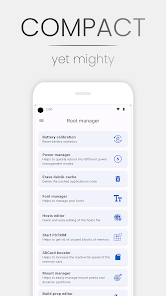
System Tools Android is a true utility processor. This program includes many small utilities for finer work with the system (including root utilities).
➤ MORE THAN TWENTY USEFUL UTILITIES AND FUNCTIONS. The number of application functions grows with each update
➤ RESPONSIBLE DEVELOPERS. Having problems or have suggestions or comments on the program? Our team will always answer!
➤ PERMANENT UPDATES. We try to quickly fix errors in the program and timely update
This program includes all the possible utilities that are needed to simplify routine processes and to more flexibly manage the system of your device. List of program features:
– Play Integrity API Test
– Apps manager (disable, hide, manage services)
– Camera2API test
– Device info
– Check for AppOps/Busybox/Root
– Password generator
– Battery calibration
– Power manager
– Partition manager (+ advanced mode)
– Script manager
– File manager (with root support, secure deletion of files and folders)
– Font manager
– Android ID Editor
– Run FSTRIM
– DPI editor
– Brightness controller (screen, flashlight, rgb, KCAL, saturation)
– Notes
– Stopwatch
All application data is stored on your device in encrypted form.


 
Report
What's new
We are always making changes and improvements to System Tools Android. To make sure you haven't missed anything, just turn on updates.

How useful was this post?

Click on a star to rate it!

Average rating 0 / 5. Vote count: 0

No votes so far! Be the first to rate this post.

You may also like

Leave a comment

Your email address will not be published. Required fields are marked *