

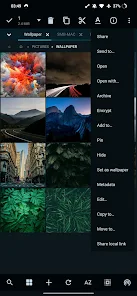


MiX Silver is a bundle of MiXplorer file manager and Archiver, Image, Tagger and PDF add-ons as a paid app to support development of MiXplorer.
FAQ: https://goo.gl/K9nf2y
Twitter: https://twitter.com/mixplorer
Skins: https://mixplorer.com/skins/
You can modify skin colors in the settings + Skin editor. There are also many theme packages with different icons to download. Tap on them + Import.
The best way indeed is to explore yourself. But here's a brief list of essential features:
– Easily themable with customization option which lets you select any color you like.
– Sort/disable/enable all menu options and action buttons.
– Unlimited Tabbed browsing and Dual panel in landscape mode and drag & drop between panels also supported.
– Easily create Tasks to multitask Copy, Move and other operations.
– Various view modes and sorting options for each folder.
– Customizable bookmarks drawer with essential file types already categorized.
– Advanced search functions.
– Html viewer.
– Font viewer.
– Export/Import all preferences and bookmarks and customized skins.
– Packing/unpacking 7z and Zip/Zip64 (splitted-encrypted), TAR, TAR.GZ, TAR.BZ2, GZIP, BZIP2, XZ, WIM, Lizard, LZ4, LZ5, Zstandard.
– Unpacking only: AR, ARJ, CAB, CHM, CPIO, CramFS, DMG, EXT, FAT, GPT, HFS, IHEX, ISO, LZH, LZMA, MBR, MSI, NSIS, NTFS, QCOW2, RAR/RAR5, RPM, SquashFS, UDF, UEFI, VDI, VHD, VMDK, XAR and Z.
– All your cloud storage needs accessible from one single app. Choose from these providers:
Mega.nz, Mail.ru, Dropbox, Box, Yandex, HiDrive, Mediafire, 4Sync, 4Shared, Meo, OneDrive, OneDrive Business, pCloud, SugarSync.
+ clouds which support webdav like (Yandex.ru, OwnCloud, MyDrive.ch, DriveHQ, CloudMe, CloudSafe).
– Modifying zip files.
– EPub, MobiPacket and PDF reader add-on.
– Root access for all advanced operations.
– EncFS volumes supported for all storages.
– File encryption and decryption using Aescrypt file format.
– FTP(S, ES)/HTTP(S)/WebDav/DLNA servers.
– SAMBA (SMB1, SMB2.0/2.1, SMB3), FTP(S, Es), SFTP, WEBDAV clients are supported as well.
– APK signer with v1, v2, and v3 schemes are supported.
– Image Viewer (it supports GIF, SVG, TGA, ICO).
– Media Player + extra video codecs add-on.
– Text Editor and Code Editor.
– RAW, TIFF and many other image decoders.
And many more awesome features for you to explore!

What's new
• General bug fixes.
Tips:
• With GDrive you can only manage files created/uploaded with this app.
• Tap on ADD in bottom toolbar + Storage + Document provider + Find & select your USB or other drives.
• Swipe the bookmark item to the right to delete/edit it.
• The default user for the servers is 'Admin'.